
UP Government Services Online 2026 — Complete Guide
Summary
Complete guide to UP government services online 2026_certificates, ration card, scholarship electricity bill _ all official portals verified.
Getting government work done in Uttar Pradesh has become significantly easier over the past few years. The state government has moved almost all major public services online from caste certificates and ration cards to electricity bill payments and scholarship applications. You can now handle most of these from your phone or computer without visiting any office.
Yet many people still miss out on these services because they do not know the right portal, find the process confusing, or end up on fake websites that waste both their time and money. This guide gives you accurate, verified information about the most important government services available in Uttar Pradesh in 2026.
UP Government Services Quick Reference Table
| Service | Official Portal | Processing Time | Fee |
|---|---|---|---|
| Caste Certificate | edistrict.up.gov.in | 7–15 days | ₹10–30 |
| Domicile Certificate | edistrict.up.gov.in | 7–15 days | ₹10–30 |
| Income Certificate | edistrict.up.gov.in | 7–15 days | ₹10–30 |
| Birth Certificate | crsorgi.gov.in | 7–21 days | Free |
| Death Certificate | crsorgi.gov.in | 7–21 days | Free |
| Marriage Certificate | igrsup.gov.in | 15–30 days | ₹10–20 |
| Ration Card | fcs.up.gov.in | 30–45 days | Free |
| Scholarship | scholarship.up.gov.in | As per session | Free |
| Electricity Bill | consumer.uppcl.org | Instant | Bill amount |
| Land Records (Bhulekh) | upbhulekh.gov.in | Instant | Free |
e-District Portal The Most Important Portal in UP
edistrict.up.gov.in is the single most important government portal for residents of Uttar Pradesh. Through this one portal you can apply for caste certificates, domicile certificates, income certificates, pension schemes, and dozens of other services — all from one login.
Key departments available on e-District:
- Revenue Department - Caste, domicile, income and financial status certificates
- Panchayati Raj Department -Village Panchayat related services
- Social Welfare Department - Old age pension, widow pension applications
- Women Welfare Department Kanya Sumangala Yojana and other schemes
- Divyangjan Department - Disability certificate
- Education Department - School related services
How to Register on e-District for the First Time
- Open edistrict.up.gov.in
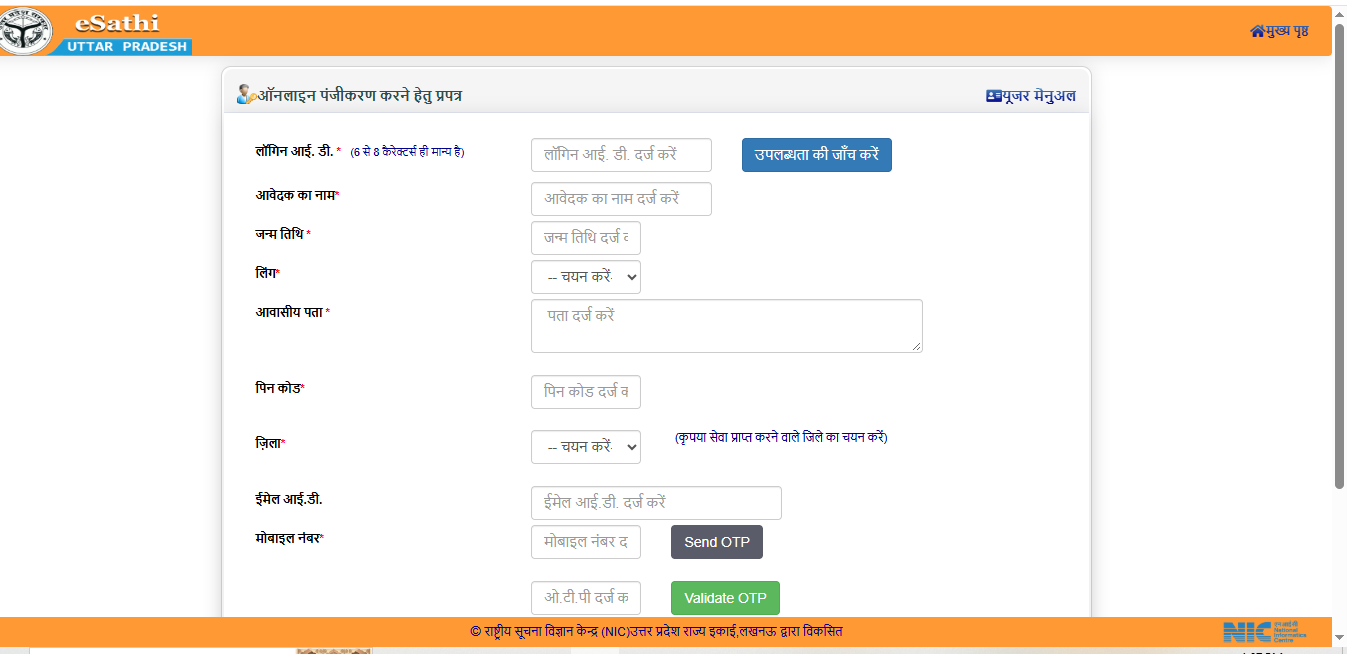
- Click on "Citizen Login (e-Sathi)"
- Select "New User Registration"
- Enter your Aadhaar number, name, mobile number and email
- Verify the OTP and create a password
- Login and choose the service you need
Once registered, you can use the same login for all services available on the portal you do not need to register again.
UP Bhulekh Check Your Land Records Online
The Uttar Pradesh Bhulekh portal at upbhulekh.gov.in lets you view land records including Khatauni, Khasra numbers and land maps online completely free of charge.
What you can check on UP Bhulekh:
- Khatauni copy owner details and land description
- Land information by Khasra number
- Bhu-Naksha - digital map of your land plot
- Revenue village Khatauni records
Simply visit the portal, select your district, tehsil and village all land details will appear on screen instantly.
Common Service Centres (CSC) If You Cannot Apply Online
If you do not have internet access or find online applications difficult — visit your nearest Jan Seva Kendra (Common Service Centre). These centres are present in almost every village and ward across Uttar Pradesh.
Services available at CSC centres:
- Applications for all certificates
- Scholarship application assistance
- Aadhaar update and correction
- PAN card application
- Banking services
- Insurance services
To find your nearest CSC centre, visit locator.csccloud.in and enter your PIN code.
5 Important Things to Keep in Mind
1. Always use official government websites only
All UP government websites end with .gov.in or .nic.in. Never enter your personal details on any website that looks official but does not carry these endings. Fake websites designed to look like government portals are common and can steal your information.
2. Always save your Application Number
After applying for any service, you will receive an Application Number. Take a screenshot or write it down immediately. Without this number you cannot check the status of your application.
3. Fill forms exactly as per your Aadhaar Card
Enter your name and date of birth in every form exactly as they appear on your Aadhaar Card. Even a small spelling difference can lead to rejection of your application.
4. Avoid middlemen and touts
The fee for most certificates on official portals is between ₹10 and ₹30. Anyone asking for significantly more is a tout. CSC centres charge a government-fixed service fee which is reasonable but unauthorised agents can charge many times more for the same work.
5. Watch deadlines carefully
Scholarship applications, government schemes, and some certificates have strict deadlines. Once the deadline passes, applications are not accepted. Visit UPDigital.in regularly we keep you informed about all important upcoming dates.
How to File a Complaint — If Your Work Is Not Done
If a government office is not processing your application or causing unnecessary delays, you can escalate through these official channels:
- Jansunwai Portal: jansunwai.up.nic.in Direct complaint to the Chief Minister's office
- IGRS UP: igrsup.gov.in Registration-related complaints
- CM Helpline: 1076 — Chief Minister Helpline (24x7)
Also read: Income Certificate UP Online Apply 2026 | Caste Certificate UP Online Apply 2026 | UP Scholarship 2026-27 | UP Electricity Bill Online Payment
Disclaimer: UPDigital.in is an independent informational platform and is not affiliated with the Government of Uttar Pradesh. Information here is verified from official sources as of September 2026. Government processes and fees are subject to change always verify the latest information on the relevant official portal before applying.
Frequently asked questions
UP mein sarkari kaam online kaise karein?
edistrict.up.gov.in par register karein aur apni zaroorat ki service chunein — jati, niwas, aay praman patra sab ek jagah milega.
UP government ki official website kaisi pahchanen?
UP sarkar ki sabhi official websites .gov.in ya .nic.in se khatam hoti hain. Kisi bhi aur website par apni jaankari na dein.
Sarkari kaam nahi ho raha to kahan shikayat karein?
jansunwai.up.nic.in par Chief Minister office ko seedha shikayat karein. Ya CM Helpline 1076 par call karein.
CSC centre kahan milega?
locator.csccloud.in par apna PIN code daalein — najdeeki Jan Seva Kendra ka pata milega.
Application number kyun zaroori hai?
Bina application number ke aap apne aavedan ki sthiti jaanch nahi kar sakte. Hamesha screenshot lein ya likh kar rakhein.
Spotted something out of date? Tell us and we will re-check the source. Report a correction